.avif)

Optical Character Recognition (OCR) has become a foundational tool for organizations undergoing digital transformation. By converting scanned documents, PDFs, and photographs into usable data, it eliminates manual data entry and accelerates information accessibility. The technology analyzes character shapes within images and translates them into machine-readable text, allowing industries such as finance, healthcare, legal services, logistics, and retail to streamline processes, reduce errors, and support regulatory compliance.
As text recognition technology continues to improve in both accuracy and speed, understanding its capabilities and limitations has become essential for teams working to optimize document workflows.
To maximize value, organizations should choose a scalable solution that aligns with their document types, accuracy requirements, and operational goals.
What Is OCR and How Does It Work?
Optical Character Recognition converts various types of documents into digital data — from scanned papers to PDFs and camera-captured images. Once text is recognized, it becomes editable and searchable, transforming how businesses store and manage information.
This technology typically involves:
- Analyzing image content
- Identifying and interpreting characters
- Converting them into a digital format
Modern text extraction engines can handle a wide range of fonts and styles and, in some cases, even handwritten input. This makes it useful across sectors that rely on fast, reliable digitization and structured data access.
As a result, companies can operate more efficiently, automate repetitive tasks, and enable faster, data-driven decisions.
How Text Recognition Works Behind the Scenes
The extraction process begins by scanning and analyzing the input document. Algorithms examine spacing, shapes, and patterns to distinguish characters — a technique known as pattern recognition.
Most systems follow these steps:
- Image pre-processing to improve clarity (contrast adjustment, noise removal)
- Detection of text regions
- Character recognition using stored patterns or AI models
- Conversion into machine-readable data
Advanced solutions use artificial intelligence to improve results, particularly when handling complex layouts, inconsistent formats, or challenging visuals.
Once extracted, text becomes searchable, indexable, and ready for workflows that require structured information — from automated form processing to archiving historical documents
Benefits for Businesses
This technology brings clear advantages:
- Reduced manual data entry
- Lower operational costs
- Improved accuracy
- Faster access to information
- More secure, digital-first storage
- Better foundations for analytics and reporting
However, even with these strengths, the real transformation happens when text extraction is paired with automation and AI.
IDP (Intelligent Document Processing) solutions elevate this further by enabling:
- Automatic document categorization
- Structured field-level extraction
- Validation and rule-based checking
- Integration with CRMs, core systems, and ERPs
- End-to-end document workflow automation
These advancements turn raw text into actionable insights, significantly increasing ROI
Limitations and Challenges
Despite its usefulness, traditional extraction tools do face limitations:
Accuracy Issues
- Blurry or low-quality scans
- Complex layouts (tables, mixed formatting)
- Decorative or handwritten fonts
Lack of Context
The engine identifies characters but does not understand meaning or intent.
Format & Language Restrictions
Support for certain document types, scripts, or languages may be limited.
Human Review Still Needed
Manual verification is often required for high-accuracy use cases.
Example: Invoice processing
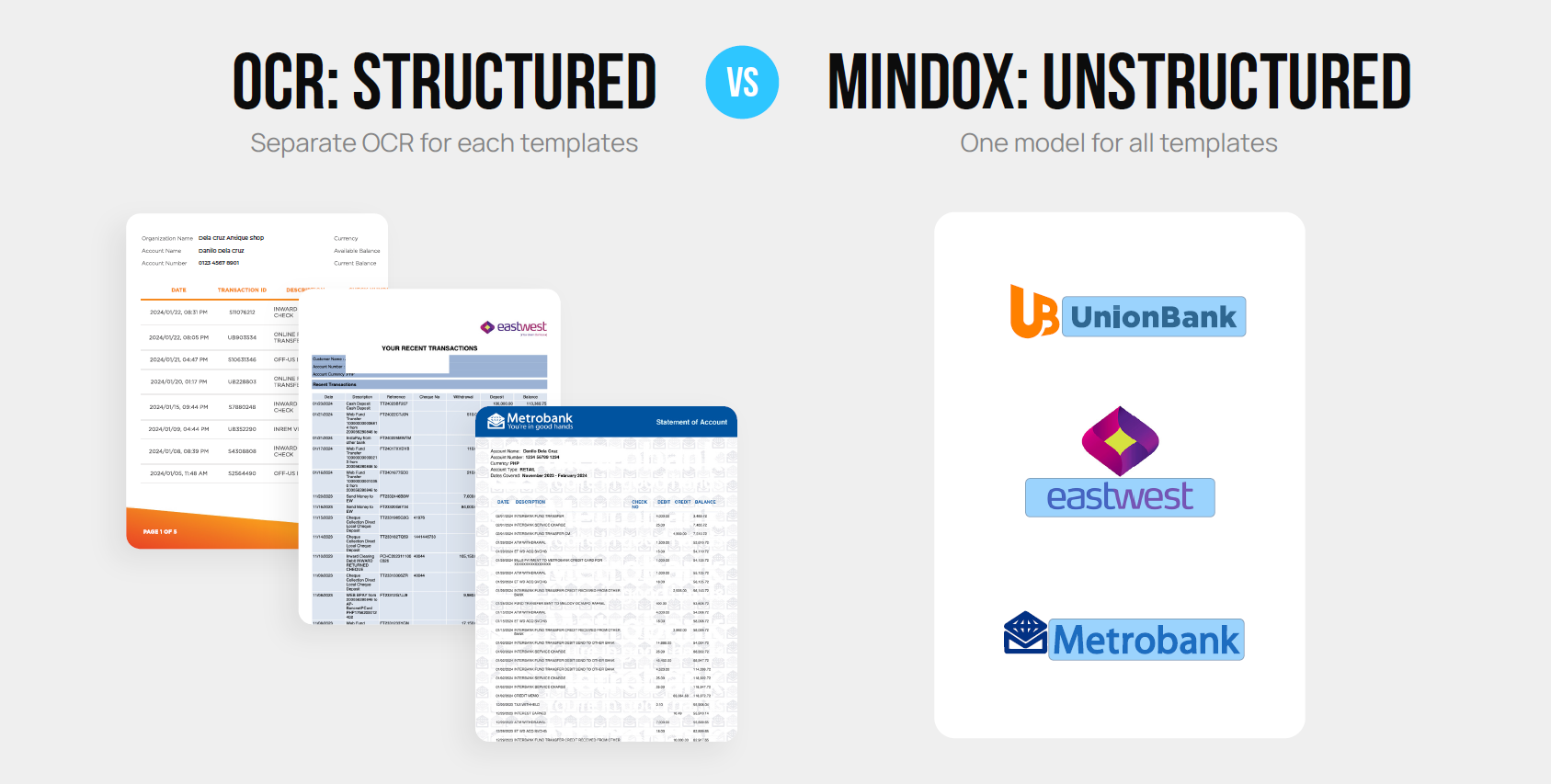
Invoices vary widely in layout and structure. A one-size-fits-all extraction approach rarely performs well. Many organizations end up creating multiple templates to achieve acceptable accuracy — increasing maintenance efforts and reducing scalability.
Modern Capabilities of Today's Tools
As OCR technology evolves, modern systems now offer far more than basic text extraction. Today’s advanced OCR engines support multiple languages, handle diverse file formats such as PDFs, scans, and mixed-media documents, and integrate with cloud and machine learning technologies for improved accuracy. These enhancements make OCR adaptable across industries like finance, healthcare, legal/compliance, logistics, and retail.
Key modern OCR capabilities include:
- Multi-language recognition
- Support for various file formats
- Machine learning–based accuracy improvements
- Customizable extraction settings
- Automated error checking
- Cloud-based scalability
These improvements significantly boost efficiency, reduce manual work, and help organizations lower operational costs. However, OCR still has fundamental limitations: while it extracts text, it does not fully understand documents, validate information, or automate end-to-end workflows.
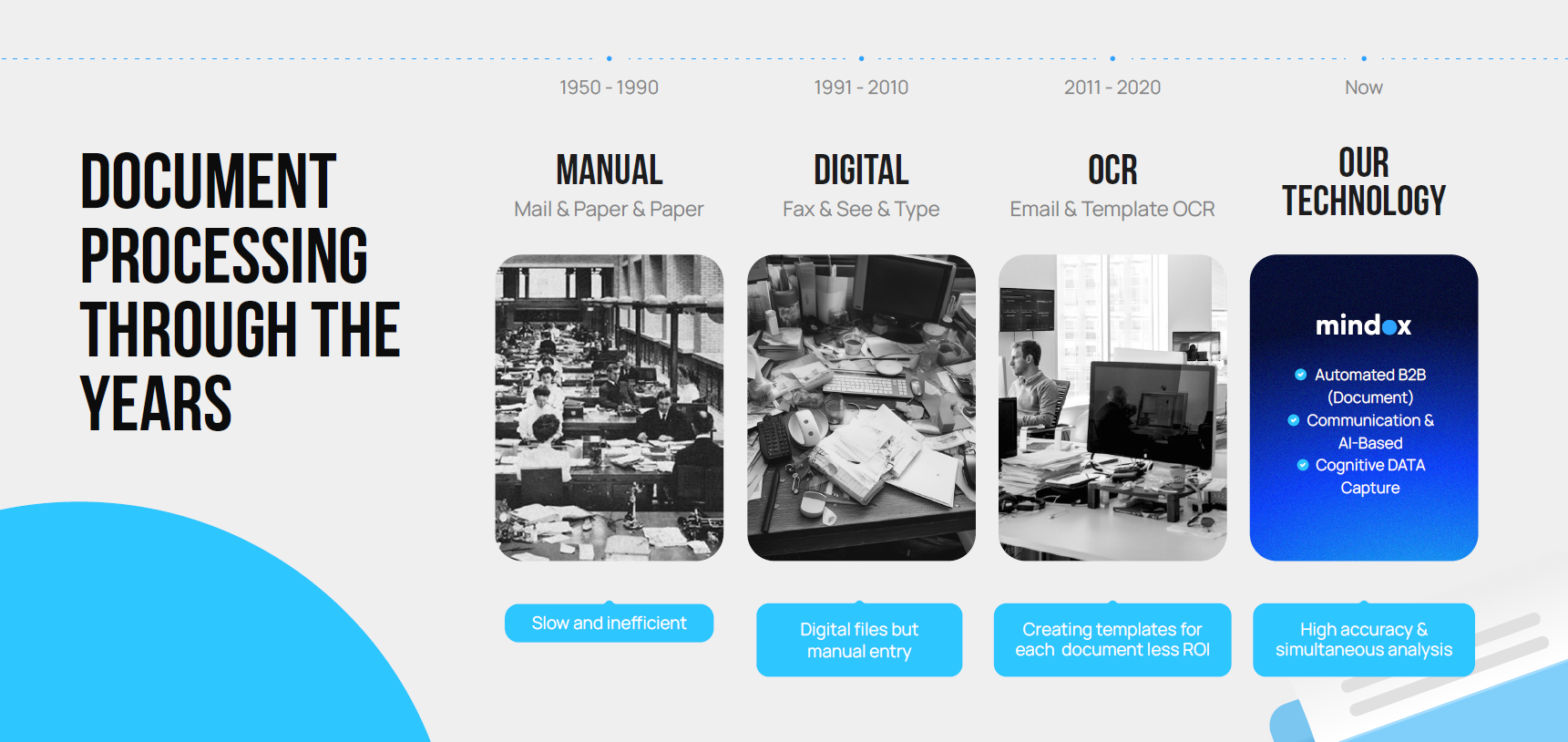
From Basic Extraction to IDP: The Evolution of Document Automation
Businesses today handle a wide range of document types: forms, IDs, invoices, receipts, contracts, handwritten notes, and unstructured PDFs. OCR alone cannot reliably classify these documents, understand context, or validate extracted information. AI and machine learning are redefining the future of text extraction. OCR is becoming more intelligent, but the major industry shift is toward IDP platforms that combine OCR with:
- Document classification
- Key-value and entity extraction
- Data validation and matching
- Workflow automation
- Integration with business systems
- Handling of both structured and unstructured documents
To better understand how OCR compares to next-generation Intelligent Document Processing (IDP), explore our full breakdown in “OCR vs IDP: What’s the Difference?.”
Instead of simply converting images into text, IDP automates entire document workflows — making it far more suitable for modern, high-volume, accuracy-critical operations.
This is the foundation of solutions like Mindox, which combine OCR, AI-based understanding, and workflow automation into one cohesive platform designed for real business processes.
Common OCR Applications Across Industries
Text extraction remains valuable across many industries:
Finance
- Invoices and receipts
- KYC documents
- Loan applications
As financial workflows grow more complex, teams rely on IDP to validate fields, match documents, and reduce manual review.
Healthcare
- Patient record digitization
- Insurance forms
- Lab result processing
IDP adds structured extraction and compliance-friendly automation.
Legal & Compliance
- Contract digitization
- Case file management
- Regulatory documentation
IDP supports clause extraction and classification for faster retrieval.
Logistics & Retail
- Inventory documentation
- Delivery receipts
- Barcode and label extraction
IDP improves accuracy with smart matching and system integration.
Across all sectors, basic OCR remains foundational — but businesses increasingly demand workflow-level automation, which is where IDP excels.
How to Choose the Right Solution for Your Business
When selecting an OCR or IDP solution, consider:
- Your document types and use cases
- Whether you need basic OCR or full workflow automation
- Language and handwriting support
- Integration with your existing systems
- Scalability and cloud availability
- Total cost of ownership versus long-term efficiency gains
If your organization handles high volumes, multiple document types, or requires validation and workflow automation, an IDP platform is more suitable than standalone OCR.
Implementing OCR begins with assessing your document types and workflows. But if your processes involve multiple steps, validation, cross-document matching, or require structured data, adopting an IDP platform is the more strategic choice. Training, systematic rollout, and continuous monitoring ensure optimal performance.
Unlocking Business Value with OCR and IDP
Converting images into text was the first step.
But modern organizations need far more than digitized content — they need intelligence, validation, and automation.
This is where solutions like Mindox provide the greatest impact, helping organizations transition from manual document handling to fully automated, AI-driven workflows.
Mindox IDP brings text extraction, classification, validation, and workflow automation together in one scalable platform.
👉 Curious if Mindox is right for your team? Book a free consultation to learn more.

Related articles

.png)